Using Native Array Columns in Luzmo
Arrays let you store multiple values in one column, like a list of tags or multiple categories for a product. With Luzmo’s new support for arrays, you can:
- Easily group and analyze these multi-value fields in charts.
- See the complete array data in regular tables for accurate reporting and context.
This opens up richer ways to explore and understand your data!
How It Works
Visualizations and Pivot Tables
In charts and pivot tables, array columns are automatically split into their individual items (this is called “unnesting”).
→ This means you can group by these items, count how often they appear, or analyze them just like other supported columns (like numeric, hierarchy, date, or datetime).
Regular Tables
- In regular tables, array columns remain nested.
This combination makes it easy to both break down arrays for analysis and see them in their original format.
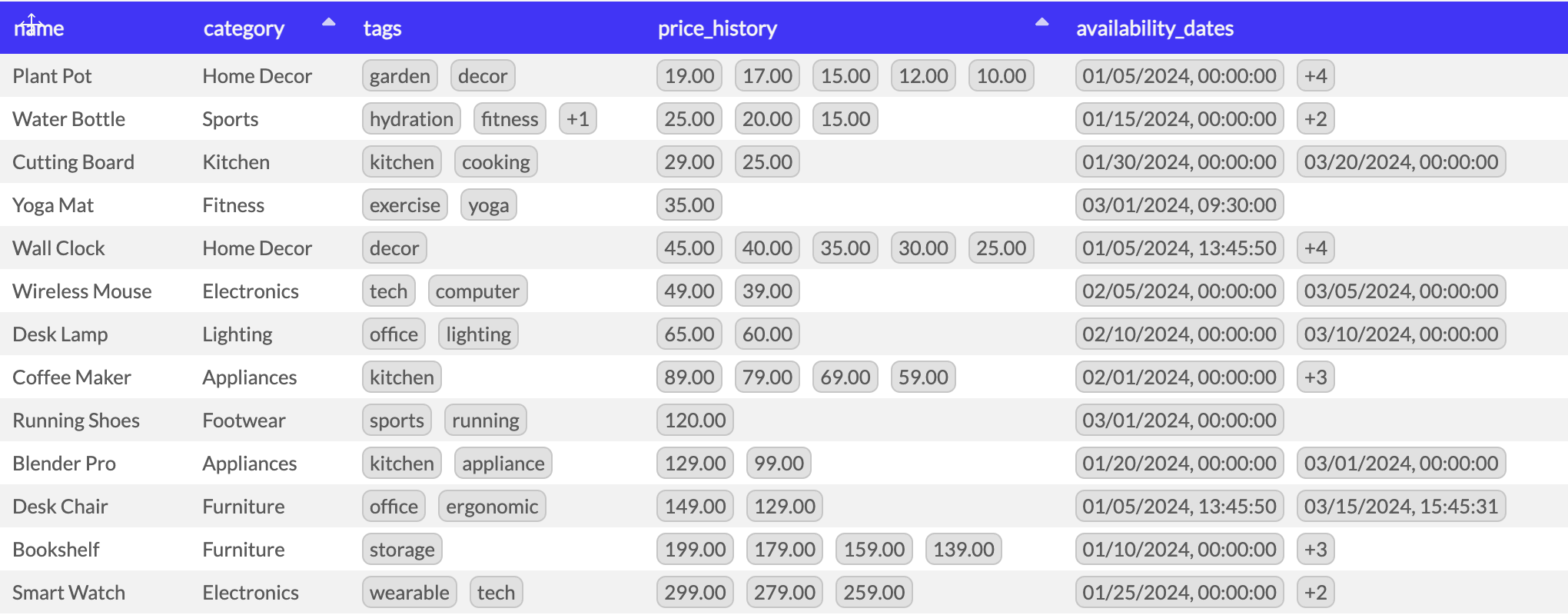
→ This way, you see the entire list of values for each row exactly as it appears in your database.
Filtering on Array Columns
Array columns can be filtered through interactivity Filter Items and through array-specific expressions in chart, dashboard, and embed filters.
Interactivity Filters (Filter Items)
You can filter array columns using Dropdown, Slicer, or Search Filter Items.
These filters work with unnested values: each value in the array is treated as an individual value. For example, if a product has the tags ["home", "tech"] and the user selects tech, the product is included in the results.
Chart, Dashboard, and Embed Filters
When configuring a filter on an array column, you can use the following array-specific expressions:
| Expression | Use it to |
|---|---|
includes |
Find arrays containing a specific value |
excludes |
Find arrays that do not contain the specified values |
includes any |
Find arrays containing at least one of the specified values |
includes all |
Find arrays containing every specified value, with or without additional values |
includes only |
Find arrays containing exactly the specified values and no others |
has value starting with |
Find arrays with an element starting with specific text |
has value ending with |
Find arrays with an element ending with specific text |
has value containing |
Find arrays with an element containing specific text |
does not have value containing |
Find arrays where no element contains specific text |
length equals |
Find arrays with an exact number of elements |
length less than or equal to |
Find arrays with at least a certain number of elements |
length greater than or equal to |
Find arrays with at most a certain number of elements |
For example, you can:
- Show products tagged food AND healthy using
includes all. - Show employees who speak English OR French using
includes any. - Show products tagged only food and healthy, with no additional tags, using
includes only. - Show companies that do not operate in Belgium using
excludes. - Show orders containing a product code starting with EU- using
has value starting with. - Show articles where a keyword contains climate using
has value containing.
Note: Text-matching expressions are case-insensitive. When using
includes only, the order of the values and duplicate values do not affect the comparison.
Important Limitations
- Array columns are not supported in Derived Columns or Aggregation Formulas.
- Period-over-Period analysis is not supported on array columns.
- Alert conditions and triggers do not support array columns.